
 is set to release the admit cards for the CS Executive.)
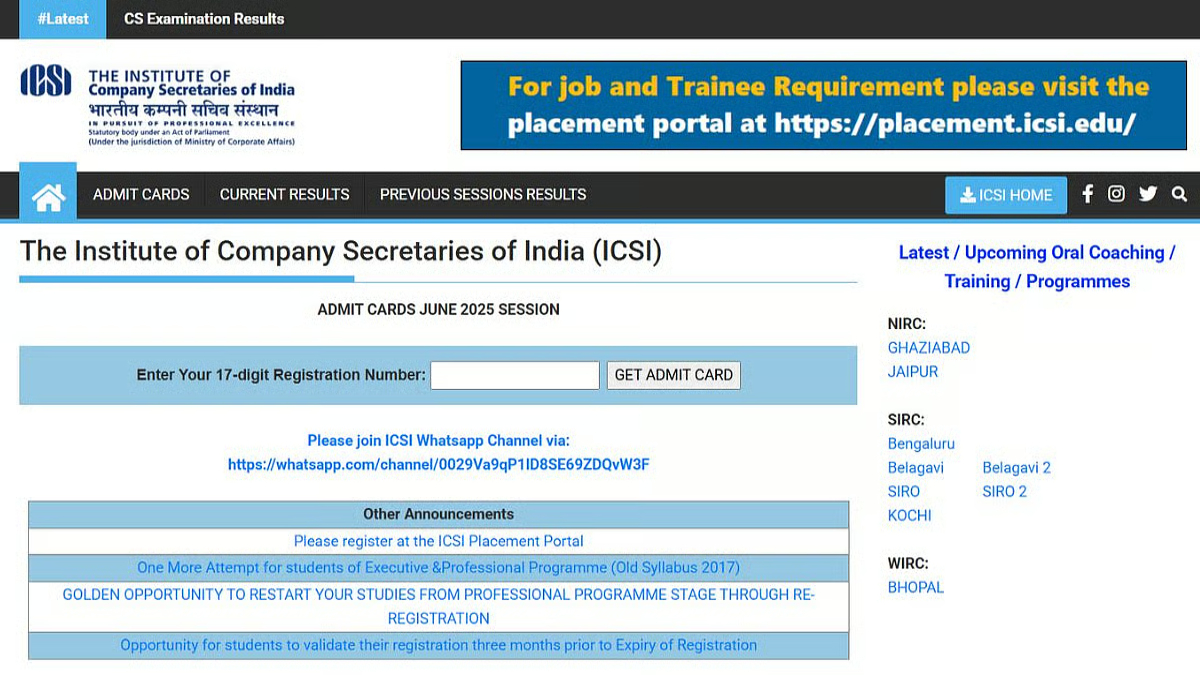
New Delhi, December 02, 2025: The Institute of Company Secretaries of India (ICSI) is set to release the admit cards for the CS Executive and CS Professional examinations for the December 2025 session very shortly. This crucial document is the final step for thousands of aspirants preparing to sit for these high-stakes exams. Candidates are advised to keep a close watch on the official ICSI website, as the release is expected to be imminent.
This news brings excitement and a final push for preparation to all candidates. The admit card, once released, will contain all the necessary logistical information required for the examination, including the candidate’s personal details, test centre address, and schedule.
Expected Release Timeline and Official Platform
While the ICSI has not yet announced an exact date, based on previous trends, the admit cards are typically released 10 to 21 days before the commencement of the main examination session. Given that the December 2025 exams are scheduled to begin in mid-December, candidates can expect the admit card to be available in the first week of December 2025.
All candidates must remember that the admit card will be available only on the official website of the Institute: ICSI Official Website. The Institute does not send the admit cards via post or email.
How to Download Your CS Admit Card (Step-by-Step)
Downloading your admit card is a simple, straightforward process. Candidates should follow these steps once the official notification is released:
- Visit the Official Website: Navigate to the official website of The Institute of Company Secretaries of India (ICSI).
- Locate the Link: Look for the dedicated link on the homepage titled something similar to “Download E-Admit Card for CS December 2025 Examination.”
- Enter Credentials: Click on the link and you will be directed to the login page. You will need to enter your 17-digit Registration Number (often referred to as your Unique ID) and the security code/CAPTCHA displayed on the screen.
- View and Verify: Once logged in, your admit card will appear on the screen. Carefully check all the details listed on it.
- Download and Print: Download the admit card in PDF format and take at least two printouts. Ensure the printout is clear and all details, especially the photograph and signature, are visible. It is recommended to use an A4 sheet for printing.
Crucial Details to Verify on the Admit Card
The admit card is a non-negotiable entry pass to the examination hall. Candidates must thoroughly check the following details immediately upon downloading:
- Candidate’s Name and Photograph
- Registration Number and Roll Number
- Exam Centre Name and Address: Ensure you know the exact location and plan your travel time.
- Date and Time of Exam: Verify the subject-wise schedule carefully.
- Signature of Candidate and Institute Official
- Important Instructions
If any discrepancy or error is found in your personal details, exam centre, or photo/signature, you must immediately contact the ICSI Examination Department and get it rectified before the exam date.
Mandatory Items for Exam Day
Candidates are strictly instructed to carry the following items to the examination centre:
- A hard copy printout of the E-Admit Card.
- A valid Student Identity Card issued by the ICSI. If the ID card is not available, you must carry a valid photo ID (e.g., Aadhar Card, Driving License, Passport, or PAN Card) along with the fee receipt of the current examination session.
- Necessary stationery items (Pens, Pencils, etc.) in a transparent pouch.
Note: Electronic gadgets, including mobile phones, smartwatches, and programmable calculators, are strictly prohibited inside the examination hall.